

Introduction
If you're enrolled at a U.S. college right now, there's roughly a coin-flip chance your courses run on Canvas. Phil Hill's year-end 2024 LMS market report for On EdTech found that Instructure Canvas holds a 50% share of North American higher education enrollments. Learn it once and you'll use it in half your classes, probably more. That's not hype. That's market math.
And yet students still treat Canvas like a broken version of Google Classroom. A junior named Tony Ramirez told his student newspaper, The Plaid Press, that Canvas "takes three steps to get to the assignment instead of just clicking the link." I run orientation labs every August. That quote gets nervous laughter every single time. Because it's true.
Here's what most Canvas tutorials won't tell you: the software isn't the hard part. Your professor's course layout is. One class organizes by week in Modules. Another hides the Assignments tab entirely. A third posts readings with no due date, so they never hit your Calendar. This guide gives you a semester-ready workflow, a missing-assignment decision tree, and the submission checks that stop "I thought I turned it in" disasters. I've trained over 4,000 students on LMS basics. The ones who struggle aren't less capable. They just don't have a system.
What Is Canvas for Students?
Canvas for students is Instructure's learning management system where you access syllabi, submit assignments, take quizzes, check grades, and message instructors. Log in through your school's Canvas URL, use Modules as your course map, turn on immediate notifications for due dates, and track deadlines in the Calendar across all classes.
That's the short answer search engines want. The longer answer matters more once you're juggling four courses with four different professors who each think their layout is obvious.
Canvas is the student-facing side of a platform roughly
30 million people used worldwide as of 2026,
according to NPR's reporting during the May Instructure outage.
Your institution almost certainly auto-created your account. You
log in through a school-specific URL (something like
canvas.yourschool.edu) or through your campus
portal. The global left sidebar shows Dashboard, Courses,
Calendar, Inbox, and Account. Inside each course, you'll see
tabs like Modules, Assignments, Grades, Discussions, and Files.
Which tabs actually appear? That depends on what your professor
turned on. The
Instructure Student Getting Started guide
lists over 200 how-to articles. Helpful if you already know what
you're looking for. Overwhelming if you don't.
Instructure incorporated in 2008 and launched Canvas as a cloud-native LMS in January 2010, according to Alabama Community College System procurement records. The company open-sourced the platform in February 2011. Back then Blackboard dominated. Canvas won schools by being browser-based, cleaner, and easier for faculty who hated clunky admin panels. The University of Minnesota's 2016 LMS Market Dynamics report noted Canvas was capturing the majority of new higher ed implementations in the U.S. and Canada. That shift is why you're clicking Modules instead of downloading PDFs from a professor's personal website.

So what should you actually do each week? This five-step system is the backbone of the rest of this guide:
- Harden notifications on web and mobile, then verify each course hasn't overridden your alerts.
- Open Modules first in every course before you touch the Assignments tab.
- Track deadlines in Calendar across all classes, not course by course.
- Debug missing work with publish status, availability dates, and hidden navigation checks.
- Submit early and back up files locally so a platform glitch doesn't eat your essay.
Canvas also runs integrated tools your professors add: Turnitin, Gradescope, Respondus LockDown Browser, Pearson, McGraw-Hill. You'll see them as external links inside assignments. Same login, different interface. Budget extra time the first time you use each one.
Why Your Canvas Workflow Matters More Than the Dashboard
Frankly, the Dashboard is where students develop bad habits. The To-Do sidebar looks helpful. It isn't complete. A student newspaper reporting for The Plaid Press put it plainly: "Not all assignments show up in the dashboard of Canvas, which can lead to students missing work simply because it was hidden under seven other assignments in the sections modules or discussions." I've watched that happen in real time during week four of a semester. Student swears they're caught up. They never opened Discussions.
University of Pittsburgh's IT team collected blunt student feedback in 2024: "If I can't find anything, the Canvas course is just a source of frustration instead of help. When my professor tells me it was on the Canvas site, all I think is, 'Where?! Because I looked and didn't find it!'" That sentence should be printed on every faculty Canvas workshop slide. The Pitt Canvas design blog documents the gap between how professors organize courses and how students actually hunt for materials.
The University of Delaware's Canvas instructional design team states it directly: if students struggle with your course site, they spend more time finding content than learning it. That's not a student failure. That's a design problem students have to work around because they can't redesign the course themselves.
Canvas didn't always dominate this mess. When Instructure released Canvas in 2010, Blackboard still held roughly a third of the U.S. and Canadian market, per the University of Minnesota's tracking data. Canvas grew by winning elective migrations, schools choosing to switch rather than being forced by a product shutdown. By 2017, EDUCAUSE faculty surveys showed Canvas still gaining share while Blackboard declined. COVID-19 accelerated everything. When campuses went remote in March 2020, the LMS became the classroom. Students who'd ignored Canvas all freshman year suddenly lived inside it.
Where are we now? Phil Hill's 2024 year-end data puts Canvas at 50% of enrollments in U.S. and Canadian higher ed. D2L Brightspace sits around 20%. Blackboard near 12%. If you're a new student in 2026, you inherited that winner-take-most market. You also inherited the May 2026 Instructure security crisis, when a breach and platform outage locked students out of coursework during finals prep at schools including Penn State, UIUC, and Baylor. NPR reported that roughly 30 million users depend on the platform. Trend Micro's analysis tied the incident to nearly 8,809 institutions across 50 countries. Canvas going dark is no longer theoretical. It's a reason to save local copies and your professor's email outside the LMS.
There's research behind the weekly check-in habit, not just IT common sense. A 2024 California State University Long Beach study found that specific Canvas engagement metrics (quiz views, module page clicks, course homepage visits) explained up to 94% of variance in final grades for one graduate course section. Passive syllabus-only browsing didn't help. Active participation in the tools did. You don't need to become a data nerd. You need a repeatable Sunday routine: scan Calendar for the week, walk each course's Modules, clear Inbox messages, check Grades for missing submissions.
I'll be honest. No workflow fixes a professor who never publishes modules or posts due dates the night before. This system won't make a chaotic shell beautiful. It will stop you from losing points to navigation problems you can actually control. The next section walks you through notification settings that most students configure once and never revisit. That's where we'll start.
Step 1: Configure Canvas Notifications (Web and Mobile)
Missed deadlines are rarely a surprise on Canvas. They're a settings problem. I see it every August: students configure notifications once during orientation, never touch them again, then blame the professor when a quiz closes at midnight. Half the time, their alerts were set to Daily Summary. The other half, a single course overrode their account defaults without them knowing.
Start on the web. Click Account in the global left sidebar, then Notifications. You'll see rows for course activities and columns for each contact method (email, push, SMS if enabled). Hover over an icon to change frequency. The San Jose State Canvas student quick guide breaks down the four icons: checkmark (notify immediately), clock (daily summary), calendar (weekly summary), and X (off).
Which Alerts to Turn On Immediately
Turn on immediate notifications for anything deadline-related. My minimum list:
- Due date (assignment and quiz date changes)
- Announcement (professor posts schedule changes)
- Submission comment (feedback on your work)
- Grading (scores posted)
- Conversation message (Inbox from instructor or TA)
Wharton's Canvas support team recommends the same core set for students: announcements, grading, invitations, files, submission comments, and appointment availability set to notify immediately. That list comes from an Ivy League business school, not my personal preference. But the logic holds everywhere.
Canvas may delay immediate notifications by up to one hour if an instructor edits the same item repeatedly. That's intentional spam prevention, per Instructure's documentation. Don't panic if an alert arrives 45 minutes after a change. Panic if you never configured alerts at all.
Check Course-Level Overrides
Here's the trap most guides skip. Account settings are your default. Course settings can override them. The University of Maryland ELMS-Canvas help desk states plainly: course-level notification preferences override account-level settings. Rice University's Canvas team calls this a "notification override," meaning that course stops following your global preferences for any row you change.
Every first week of a new course, open the course Home page and click View Course Notifications in the right sidebar. Yale's Canvas documentation walks through the same button. Verify the course-level toggle says notifications are enabled (green check, not gray X). Then scan the rows. If Announcements shows weekly summary for this course only, fix it before your professor posts a schedule change you'll never see.
Download the Canvas Student app and mirror your settings. Push notifications only work if your phone allows them at the OS level. Instructure renamed the app to "Canvas by Instructure" in August 2025, per Wharton's knowledge base. Same app, new name in the store.
Check your email contact methods under Account → Settings. If you see a red exclamation mark next to your address, you're on Canvas's suppression list, usually because a previous notification bounced. The University of Illinois Canvas help article says you need IT to escalate removal from that list. No amount of clicking bell icons fixes a suppressed email.
notifications@instructure.com. Star that sender
once messages arrive.
Step 2: Navigate With Modules First (Not Assignments)
Walk into any course and open Modules before you touch anything else. That single habit prevents more missed work than every productivity app combined. Modules are how your professor intended you to move through the class. Assignments is just a flat list. Sometimes it's hidden entirely.
Canvas Modules vs Assignments: Which Should You Use?
Modules show the week's readings, videos, quizzes, and assignments in order. Assignments show every gradable item in one scroll, if your professor left that tab visible. When both exist, start with Modules. When Assignments is missing from the left menu, Modules is your only map.
The Louisiana Tech Canvas student guide notes explicitly that instructors may hide the Assignments link. You can still reach assignments through Modules, Syllabus, Calendar, or Grades. Students who only hunt the Assignments tab stare at a blank nav bar and assume they're done for the week. They're not.
A student newspaper reporting for The Plaid Press described the failure mode clearly: work buried "under seven other assignments in the sections modules or discussions," invisible on the Dashboard. I've replicated that scenario in training labs. Student opens Assignments, sees three items, relaxes. Meanwhile Module 4 contains a discussion post worth 10% of the grade. Never on To-Do. Never on Calendar if ungraded.
Boston College's digital learning team advises professors to keep modules under eight items per unit so students can build a mental model. You can't control their design choices. You can scan the full module list even when it looks long. Use Cmd+F or Ctrl+F on the Modules page to search for keywords like "essay" or "quiz 2."
Check Discussions separately. Many professors treat discussion posts as weekly participation grades. They live outside the Assignments list unless cross-linked. Same for Quizzes nested inside modules with confusing names like "Lecture Check-In."
When Modules look chaotic, fall back to the Syllabus page. It often lists due dates in table form even when module headers don't. University of Pittsburgh students complained in 2024 that scattered materials made the site "a source of frustration instead of help." Syllabus is the backup map when Modules fail you.
| Tool | Best For | What It Misses | When to Use |
|---|---|---|---|
| Modules | Professor's intended weekly path | Items not placed in modules | First stop every login |
| Assignments | Flat list of gradable work | Hidden tab, ungraded tasks | Second pass if tab exists |
| Dashboard To-Do | Quick cross-course snapshot | Discussions, ungraded pages | Morning glance only |
| Syllabus | Due-date overview table | Mid-semester changes | Week one + after big announcements |
Step 3: Track Deadlines With Calendar and a Sunday Audit
Canvas Calendar pulls due dates from every enrolled course into one view. Color-coded by class. That's the only place you see cross-course collisions before they wreck your week. A 2023 Student Voice survey, cited in a Swarthmore computer science policy study, found that 51% of students agree they depend on deadlines to stay on track and stay motivated. Remove the deadline signal and half the room drifts.
Open Calendar from the global left sidebar. Switch between month, week, and agenda views. Agenda is underrated during finals. It lists the next seven days linearly without visual clutter. The Dashboard To-Do sidebar shows upcoming items too, but only items with due dates attached. Readings without dates never appear. That's not a bug. It's how Canvas treats ungraded content.
On mobile, set per-assignment reminders. Instructure's guide for Android lets you choose five, fifteen, or thirty minutes before, or one day or one week out. You can stack up to ten reminders per assignment. I recommend one day before for major essays, thirty minutes before for quizzes.
Canvas does not email students a native "24 hours until due" alert. Boise State's teaching tools wiki notes instructors can schedule announcement posts instead. You cannot rely on professors to do that every time. Build your own reminder layer.
Old Dominion University's 2024 weekly Canvas analytics framework treats Monday data review and Friday progress checks as a structured intervention cycle. Translate that for yourself: every Sunday evening, spend 15 minutes on a personal audit.
- Open Calendar and scan the next seven days across all courses.
- Walk each course's current Modules week block.
- Clear unread Inbox messages from instructors.
- Check Grades for missing submissions (dash or zero with no score).
That Sunday block catches the assignment your professor added Thursday night with a Tuesday due date. The one that never hit your phone because you were in class when they posted it.
Step 4: Find Hidden Assignments (Decision Tree)
"It's on Canvas." Famous last words. A University of Pittsburgh student told the IT design team exactly what you're thinking when that happens: "Where?! Because I looked and didn't find it!" This section is the answer tree I walk students through in office hours. Work top to bottom. Don't skip steps.
If you cannot find an assignment on Canvas, check whether the course module is published, the assignment availability dates have started, and the Assignments link is visible in your course menu. Then search Modules and Discussions, because professors often hide the Assignments tab or place work inside unpublished weekly modules.
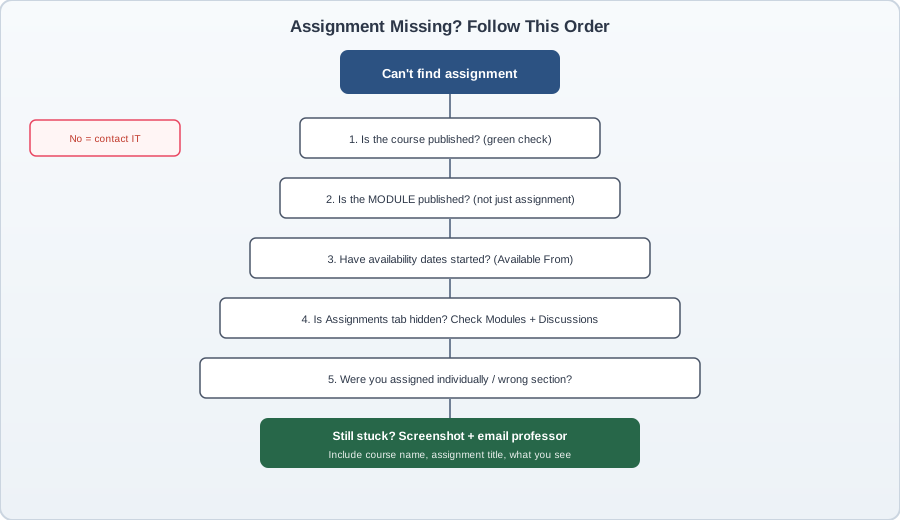
Step A: Confirm the course is published. If your professor is still building the shell, you might see the course title but no content. Goshen Schools' IT FAQ describes the fix instructors need: press the Publish button. Students cannot speed that up. You can email politely asking when modules will go live.
Step B: Check module publish status, not just the assignment. Iowa State's Canvas support documentation is blunt: if either the item or the module is unpublished, students may not see content. A green check on the assignment inside a gray unpublished module still hides the work from your view. Both need green checks.
Step C: Verify availability dates. The University of Illinois iSchool help site explains that availability dates control when students can view and submit. Before the "Available from" date, the assignment exists but locks. After the "Until" date, it closes. Due date and availability window are not the same thing. You can have a due date next Friday but an availability window that ended yesterday.
Step D: Hunt outside the Assignments tab. Search Modules by keyword. Open Discussions. Check Quizzes. MSU Denver's CTLD team notes that content must be published and placed in a published module to be visible. Content floating in Files without a module link is professor-only territory.
Step E: Ask about section assignments. Instructure's community forums describe professors assigning work to Section 002 while you're in Section 001. The assignment is published. You're not on the list. Screenshot your Assignments page and Modules view, then email: "Here's what I see. Can you confirm the assignment is assigned to my section?"
Stanford's Canvas help center warns that announcements posted before a course publishes do not generate notifications. If your professor swears they announced it last week, check the Announcements page manually. Scroll the full history.
Step 5: Submit Assignments Correctly (and Confirm It Worked)
Uploading a file is not the same as submitting it. I cannot count how many panicked emails I've fielded from students who attached their essay, closed the tab, and assumed Canvas recorded the submission. It didn't. Canvas requires two clicks minimum: open the assignment, then click Submit Assignment after your file attaches.
The standard file-upload flow: open the assignment from Modules, click Submit Assignment, choose Upload File or drag your document into the box, wait for the upload progress bar to finish, then click Submit Assignment again. The SJSU Canvas student quick guide walks through the same sequence with screenshots. You should see a green confirmation banner and a timestamp under Submission Details.
Google Docs and External Tool Submissions
Google Docs assignments are where students lose the most points to process errors, not content quality. Tony Ramirez's complaint to The Plaid Press about extra clicks wasn't exaggeration. You often open the doc, edit it, then still need to return to Canvas and finalize.
Three workflows exist. Know which one your professor enabled:
- File upload of exported PDF: safest. Download or print to PDF, upload manually. No Google account conflicts.
- Google Drive LTI link: click the Google Drive icon inside the submission box, authorize Canvas to access Drive, select the file. The University of Minnesota IT guide warns that the Canvas Student app is not fully supported for Google Drive. Use a desktop browser.
- Google Cloud Assignment: Canvas makes you a personal copy automatically. Edit inside Canvas, submit from there. Chemeketa College's academic innovation team recommends this tool specifically because it avoids multi-account sharing headaches.
Common failure: logged into a personal Gmail while Canvas expects your school account. UMN's fix is blunt. Sign out of extra Google accounts or use an incognito window with only your .edu login. Another failure: Invalid Submission File Type. The University of Michigan Canvas help desk documents this error when instructors restrict file types. You may need to export as PDF and re-upload, or ask your professor to widen accepted formats.
After any external tool submission, open Submission Details and confirm the timestamp. SpeedGrader annotations appear later. Don't resubmit unless your professor allows multiple attempts. A second upload can overwrite your first.
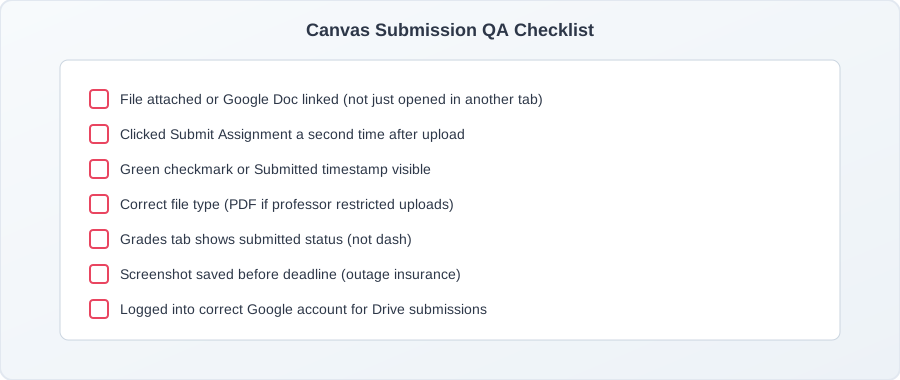
Text entry assignments skip file upload but still need the second Submit click. URL submissions need a live link that opens without login walls. Quiz submissions lock when time expires. Budget two minutes to verify, not two seconds.
7 Canvas Mistakes That Cost Students Points
Most Canvas point losses aren't about intelligence. They're about repeatable workflow errors. Here's what I see every semester, backed by student feedback Pitt collected in 2024 and the IT tickets I handle in August.
Mistake 1: Trusting the Dashboard To-Do list alone. The Plaid Press reported that work hidden in modules or discussions never surfaces on the Dashboard. Students think they're caught up. They're not. Fix: Modules first, every login.
Mistake 2: Ignoring stale Announcements. A Pitt student admitted that when the latest announcement is a month old, they assume it's outdated and wait until class to ask. Meanwhile the professor posted a schedule change in Modules nobody noticed. Fix: scan Announcements history at the start of each week.
Mistake 3: Wrong file or wrong attempt submitted. You uploaded draft_v2.pdf but the final was draft_v3.pdf. Canvas won't guess. Fix: open Submission Details and preview the file before the deadline.
Mistake 4: Treating discussion posts as optional. Participation forums often carry 10-15% of the grade and live outside Assignments. Fix: check Discussions during your Sunday audit.
Mistake 5: Never reading rubric feedback in Grades. Professors leave comments inline. Students only check the score. Fix: click the assignment name in Grades, not just the number.
Mistake 6: Timezone confusion on 11:59 PM deadlines. Canvas displays times in your account timezone, but professors sometimes set dates thinking in Eastern while you're in Pacific. Fix: confirm timezone under Account → Settings and ask if due times are local.
Mistake 7: No offline backup before deadline night. During the May 2026 Instructure outage, NPR reported roughly 30 million users locked out during finals prep. Students with local copies could still email professors. Students who lived only inside Canvas could not. Fix: save every essay to your laptop and cloud storage outside Canvas.
The thread connecting all seven? Canvas shows you what professors configure. It does not configure itself. Your workflow fills the gaps their course design leaves open.
Canvas Mobile App and Student Tools Worth Using
The Canvas Student app is useful. It is not a replacement for the browser. Knowing which tasks belong on your phone saves you from the authentication errors that UMN IT documents weekly during Google Drive season.
Download Canvas by Instructure (the August 2025 rename from "Canvas Student") from your app store. Log in with QR code if your school supports it. That's faster than typing passwords on a library computer. Apple's listing notes the app serves tens of millions of learners with push notifications, offline course content, and inbox messaging.
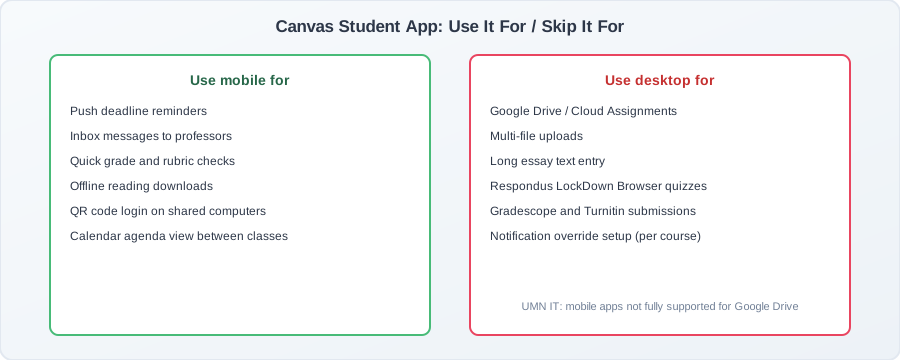
Use the app for: push deadline reminders (set one day out on heavy courses), quick Inbox replies, grade checks between classes, and offline downloads of lecture PDFs for commutes. Instructure's Android reminder guide lets you stack up to ten alerts per assignment.
Use the browser for: Google Drive and Cloud Assignments, multi-file uploads, long text-entry essays, Respondus LockDown Browser quizzes, Gradescope, and Turnitin. The UMN troubleshooting guide states plainly that neither Canvas mobile app is fully supported for Google Drive activities.
Notification sync is the hidden conflict. Students disable web email alerts because their phone buzzes, then miss messages when the phone is on silent during an exam block. Run both channels during the first two weeks until you know which one actually reaches you.
Your school may embed extra tools inside Canvas courses: Gradescope for STEM problem sets, Turnitin for plagiarism reports, Pearson MyLab for textbook quizzes. These open as external links. First use always takes longer. Budget ten extra minutes and use desktop.
When Canvas Goes Down: Your Backup Plan
Canvas going dark used to feel hypothetical. May 2026 changed that. NPR and Texas Public Radio reported that a security breach and platform outage locked roughly 30 million users out of coursework during finals preparation. GovTech documented disruptions at Penn State, UIUC, Baylor, and dozens of other campuses. Trend Micro's analysis tied the incident to nearly 8,809 educational institutions across 50 countries.
Students who only stored work inside Canvas had no access. Students who kept local copies and saved professor emails outside the LMS could still communicate. That split is the entire backup plan.
Start of semester (thirty minutes):
- Download each syllabus PDF to your laptop and phone.
- Save professor and TA emails to contacts. Do not rely on the Canvas People tab during an outage.
- Bookmark your institution's IT status page, not just Canvas itself.
- Enable two-factor authentication and store backup codes somewhere offline.
Every assignment: keep a local copy on your machine and one cloud backup outside Canvas (Google Drive, OneDrive, iCloud). Sync happens automatically once configured. When Canvas uploads fail at 11:45 PM, you email the PDF from your laptop.
During an outage: check your .edu email first. Professors often receive bulk instructions to push materials through email when the LMS is down. Refreshing Canvas fifty times does not speed restoration. Watch your school's IT Twitter or status page. After the May 2026 incident, institutions warned students about phishing emails pretending to be password reset links. Reset passwords only through official IT portals.
Do not assume due dates auto-extend. Some professors grant extensions. Others expect work emailed on time with timestamp proof. Ask early via email if the outage overlaps a deadline.
Your Weekly Canvas Audit (15 Minutes)
A Sunday audit sounds tedious until you compare it to a Sunday panic attack at 10 PM. Old Dominion University's 2024 weekly Canvas analytics framework treats structured review as an intervention cycle. California State University Long Beach research found that specific engagement actions (quiz views, module page clicks) explained up to 94% of variance in final grades for one graduate section. Passive syllabus browsing did not predict success.
You do not need analytics software. You need fifteen minutes and a repeatable checklist.
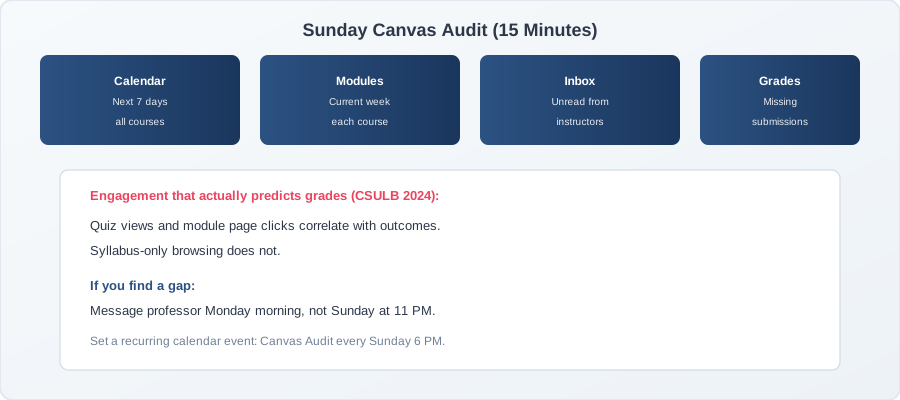
- Calendar: scan the next seven days across all enrolled courses. Note collision nights (two exams, one paper).
- Modules: open each course's current week block. Readings without due dates live here.
- Inbox: clear unread messages from instructors and TAs. Reply to anything requiring action.
- Grades: look for dashes or missing icons next to submitted work. Fix before the professor grades.
When the audit surfaces a gap, message your professor Monday morning. Not Wednesday. Not an hour before the deadline. Early questions get helpful answers. Late questions get "check the syllabus."
I'll be honest. Auditing only the courses you enjoy while avoiding the professor with the messy shell is how students fail the one class that mattered for their GPA. Start with the messiest course. Get it out of the way.
Essential Canvas Resources for Students
You do not need paid software to master Canvas. You need the right bookmarks.
Official and .edu resources:
- Instructure Student Getting Started hub (200+ official how-to articles)
- Canvas notification settings guide (vendor documentation)
- SJSU Canvas Student Quick Guide (screenshots for submissions and alerts)
- Carnegie Mellon Canvas Student Guide (Gradescope, LockDown Browser, peer review)
- CSULB Canvas engagement research (PDF) (why weekly check-ins correlate with grades)
When Canvas breaks: your campus IT help desk and Instructure's public status page beat Reddit panic threads. For Google Drive errors, start with your school's Canvas-Google integration guide before generic Google support.
When you need human help: juggling five Canvas courses with conflicting deadlines is a workload problem, not a willpower problem. Take My Class For Me pairs students with tutors who track assignments across multiple LMS courses and help you stay ahead of submission deadlines.
Putting It All Together
You started this guide frustrated that Canvas takes three clicks where Google Classroom took one. That frustration is valid. Phil Hill's 2024 data still puts Canvas at 50% of North American higher ed enrollments. You are not learning a niche tool. You are learning the platform half your classmates already use.
Here's what you now have:
- A notification setup that survives course-level overrides and email suppression
- A Modules-first navigation habit that catches work the Dashboard hides
- A Calendar plus Sunday audit rhythm backed by ODU and CSULB research
- A decision tree for assignments professors swear are "on Canvas" but you cannot find
- Submission QA steps that stop "I thought I turned it in" emergencies
- An outage backup plan informed by the May 2026 platform crisis
I'll be honest. No system fixes a professor who never publishes modules. But the students who lose points to navigation and submission errors? Those losses are preventable. I've watched it happen across 4,000 orientation sessions. The ones who build a workflow in week one rarely send panicked emails in week twelve.
Digital fluency pays beyond this semester. The U.S. Bureau of Labor Statistics projects about 6% growth for training and development roles through 2034, and most corporate learning platforms borrowed DNA from college LMS design. Students who can navigate Canvas cleanly adapt faster to workplace learning portals.
Your next step tonight: Open Account → Notifications. Set Due date, Announcement, and Grading to notify immediately. Then open one course and click View Course Notifications to check for overrides. That ten-minute task prevents more missed deadlines than any planner app you could download.
If you're already behind across multiple classes, get matched with a tutor who can help you map deadlines and catch up before the next wave hits.
![Edgenuity for Students: Complete Success Guide [2026]](system/images/thumbnails/edgenuity-for-students.svg)
![McGraw Hill SmartBook: Ultimate Success Guide [2026]](system/images/thumbnails/mcgraw-hill-smartbook.svg)
![Sophia Learning vs Straighterline: Comparison Guide [2026]](system/images/thumbnails/sophia-learning-vs-straighterline.svg)